How to Optimize Your Resume for ATS in 2026 (Step-by-Step Guide for Entry-Level Jobs)
You've sent out 50 applications this week.
Crickets.
Not even a rejection email. Just silence. And you're starting to wonder if your resume is going into some digital black hole where dreams go to die.
Spoiler: It kind of is.
Here's the thing nobody tells you: 75% of resumes never reach human eyes. They're filtered out by Applicant Tracking Systems (ATS) before a recruiter even knows you exist. And if you're applying for a tech job with no experience, that percentage climbs even higher because entry-level roles get flooded with hundreds of applications.
The system feels rigged because it is. Entry-level jobs ask for 3 years of experience. Companies say they want "fresh talent" but won't take a chance on bootcamp grads or career switchers. And even when you have the skills, the ATS treats your carefully crafted resume like spam.
But here's the good news: once you understand how ATS works, you can beat it.
This guide will show you exactly how to optimize your resume for ATS, turn your projects into experience, and finally start getting interviews for that tech job with no experience you've been chasing.

Why Good Candidates Get Ghosted (It's Not Your Fault)
Let's talk about what's actually happening in 2025.
Entry-level hiring increased by only 0.6% this year, despite predictions of growth. That means fewer opportunities and way more competition. Employers are prioritizing "immediate productivity" over potential, which is corporate speak for "we don't want to train you."
AI is replacing traditional entry-level roles. Administrative tasks that used to be job postings are now automated. And the roles that do exist? They're getting 200+ applications within the first 48 hours.
In Canada, youth unemployment sits around 13%. Job vacancy rates dropped to 2.9%. Even sectors like tech and business that used to be hiring hotspots have pulled back on degree-intensive entry-level positions.
Translation: You're not failing. The market is brutal right now.
But here's what most people miss: the real reason you're not getting interviews has nothing to do with your qualifications. Your resume is probably getting killed by the ATS before anyone can see how qualified you actually are.
Want to understand exactly why this happens? Check out the real reason you're not getting interviews, and it's not your experience.
The ATS Problem Nobody Explains

Learn how Applicant Tracking Systems scan resumes, filter candidates, and why 75% get rejected before human review. Beat the ATS bot in 2025.
📝 Video Transcript
ATS software scans your resume for keywords, formatting, and structure before ranking you against other candidates.
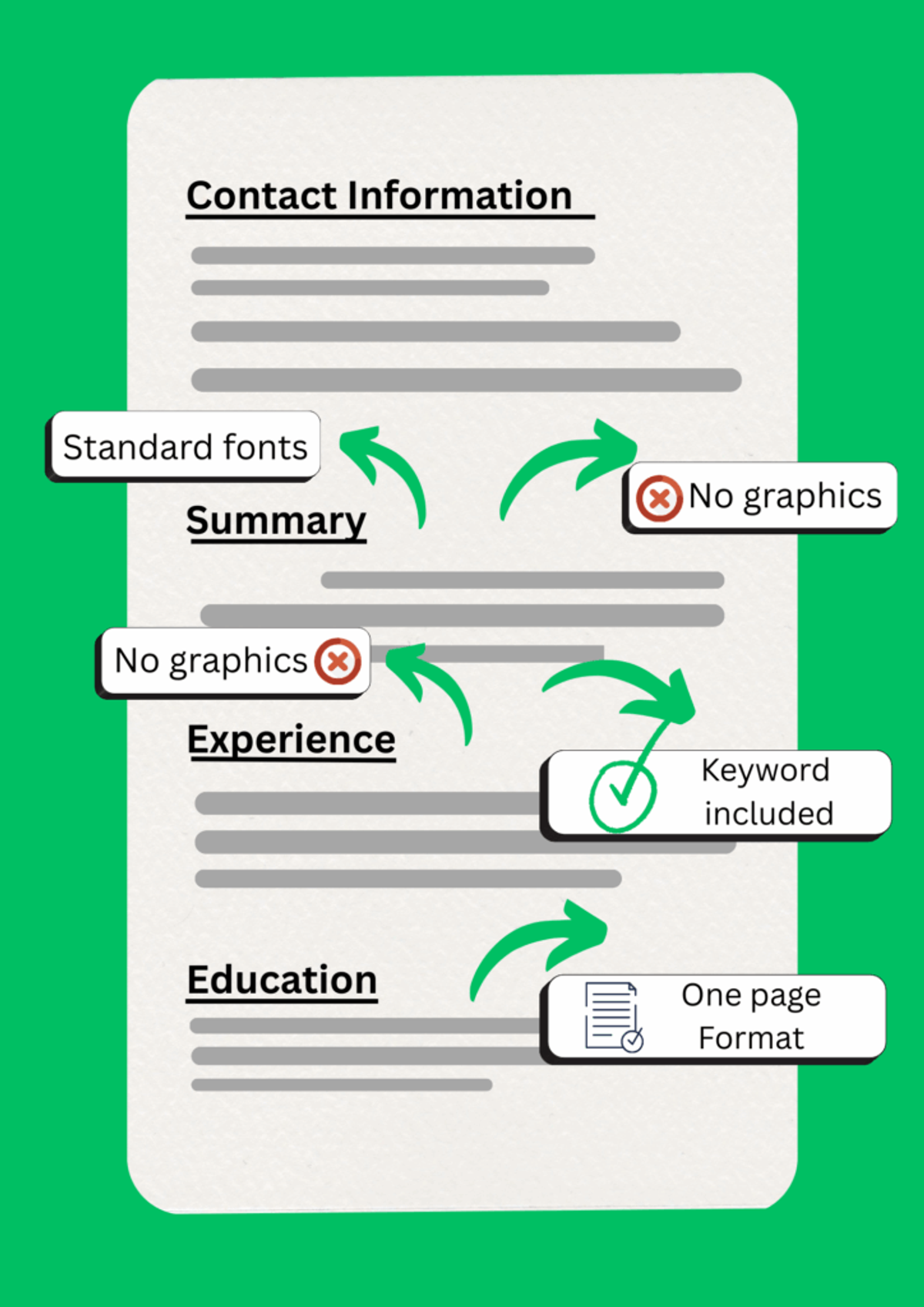
If your resume has a two-column layout? Rejected.
If you listed your GitHub projects under "Hobbies" instead of "Experience"? Rejected.
If you used creative section headers like "Where I've Made an Impact" instead of "Work Experience"? Rejected.
The bot doesn't care that you built three full-stack apps or that you're a fast learner. It's looking for exact keyword matches and standard formatting. Miss either one, and you're out.
Step 1: Turn Your Projects Into "Experience" (Because They Already Are)
Here's the anti-advice that'll change everything: Stop separating "Projects" from "Work Experience" on your resume.
That portfolio project where you built a task management app? That's work experience.
That open-source contribution where you fixed bugs and submitted pull requests? That's work experience.
That bootcamp capstone where you designed an API and deployed it to AWS? That's absolutely work experience.
The standard advice says "put projects in a separate section." But recruiters spend 6 seconds scanning your resume. If "Work Experience" is blank or only shows retail jobs, they're moving on before they ever scroll down to "Projects."

How to Reframe Projects as Experience
Instead of this:
PROJECTS Task Manager App - Personal Project - Built a React app with Node.js backend
Write this:
EXPERIENCE Full-Stack Developer | Task Management Platform January 2025 - March 2025 - Developed responsive web application using React and Node.js, serving 50+ active users - Implemented RESTful API with JWT authentication and MongoDB database integration - Deployed production application to AWS EC2 with 99.9% uptime
See the difference? Same project. But now it reads like a real job with business impact.
The Single-Column Rule
This is non-negotiable: use a single-column resume format.
Two-column templates look sleek, but ATS systems read left-to-right, top-to-bottom. When you split content across columns, the ATS scrambles everything into nonsense.
Your beautifully designed resume that puts skills on the left and experience on the right? The ATS reads it as: "Python JavaScript React" followed by "Customer Service Representative" followed by random fragments of text.
Stick with the best resume format for 2025 that actually passes ATS scanning.
Keyword Optimization for Entry-Level Developer Resumes
Pull keywords directly from the job description and mirror them in your resume.
If the posting says "experience with RESTful APIs," don't write "built backend endpoints." Write "developed RESTful APIs."
If they want "React," don't just say "JavaScript frameworks." Say "React" explicitly.
Create a "Technical Skills" section near the top with every relevant tool, language, and framework you know:
TECHNICAL SKILLS Languages: JavaScript, Python, Java, HTML/CSS, SQL Frameworks: React, Node.js, Express, Django Tools: Git, Docker, AWS, MongoDB, PostgreSQL
This section is keyword bait for the ATS. Pack it with exact matches from the job posting.

Step 2: Write a Cover Letter That Actually Gets Read
Here's more anti-advice: Generic cover letter templates are worse than no cover letter at all.
"I am writing to express my interest in the Software Developer position..." instantly signals you're copy-pasting. Recruiters can smell template language from a mile away.
But here's what works: connecting your project experience to the company's actual business needs.
Instead of talking about yourself ("I'm a hard worker who loves coding..."), talk about them:
"Your job posting mentions scaling microservices for high-traffic applications. In my recent project, I built a Node.js API that handled 10,000+ requests/day using Redis caching and horizontal scaling strategies."
See? You're showing you understand their problem and you've already solved something similar.
The Business Value Connection
Employers don't care that you "learned React." They care that you can ship features that make money or save time.
Translate technical skills into business outcomes:
- "Reduced page load time by 40%" = better user experience = higher conversion rates
- "Automated data processing pipeline" = saved engineering hours = reduced costs
- "Implemented OAuth authentication" = better security = reduced risk
This is especially crucial for landing a tech job with no experience. Since you don't have traditional work history, you need to prove you think like someone who does.
Need help crafting this for your specific situation? Read how to write a cover letter with no experience that actually works.
Why You Need Both Documents
Your resume and cover letter serve different purposes. Understanding the difference between a cover letter and resume is crucial for entry-level applications.
Your resume is the keyword-optimized, ATS-friendly document that gets you past the robot.
Your cover letter is the human-focused pitch that shows personality, problem-solving ability, and why you care about this specific role.
You need both. Always.

Step 3: Use HiringMessage as Your Secret Weapon
Let's be real: optimizing every resume and writing custom cover letters for 10 jobs a week is exhausting.
You're already balancing classes, projects, maybe a part-time job. The last thing you have energy for is rewriting the same information 50 different ways.
That's where automation helps.
HiringMessage.com is built specifically for this problem. It's an AI-powered platform that writes ATS-optimized cover letters and fixes resume formatting issues automatically.
How It Actually Works
The ATS Checker: Upload your resume and job description. The tool scans for formatting problems, missing keywords, and ATS compatibility issues. It tells you exactly what to fix before you apply.
Try the free ATS checker right now. Upload your current resume and see what's blocking you.
The AI Cover Letter Writer: Paste in the job description and your background. The AI generates a tailored, non-template cover letter that connects your experience to their needs. No more staring at a blank page.
Use the AI cover letter writer to create personalized letters in under 2 minutes.
The Experience Miner: This feature pulls achievements from your background and reframes them using business-impact language. It's like having a career coach analyze your projects and translate them into recruiter-speak.
Real Results: The "Joe" Story
Joe was a bootcamp grad applying to Amazon for a junior developer role.
He used HiringMessage's AI writer to create a cover letter that specifically addressed Amazon's leadership principles and connected his capstone project to their "customer obsession" value.
The letter stood out. He got the interview.
That's the power of tailored, non-generic applications at scale.
The Free Model
HiringMessage gives you 3 free credits on signup, then 1 free credit every 24 hours after that.
This means you can test the platform risk-free and keep using it for free if you're applying to 1-2 quality jobs per day (which is actually the optimal strategy anyway).
Step 4: Build a Sustainable Application System
Throwing resumes into the void isn't a strategy.
Here's what actually works: Apply to 5-10 highly targeted jobs per week instead of 50 random ones.
Quality over quantity. Always.
The Weekly Application Routine
Monday: Find 10 job postings that genuinely match your skills. Use filters like "entry-level," "junior," or "new grad" on LinkedIn and Indeed.
Tuesday-Thursday: Customize your resume and cover letter for each role. Use HiringMessage to speed this up. Tailor the technical skills section. Adjust project descriptions to match their keywords.
Friday: Submit all applications. Track them in a spreadsheet with columns for company name, role, date applied, and follow-up date.
Weekend: Work on portfolio projects or contribute to open source. This gives you fresh material to add to your resume each month.
The Follow-Up Strategy
Most people never follow up. This is a mistake.
One week after applying, find the hiring manager on LinkedIn and send a short, respectful message:
"Hi [Name], I recently applied for the [Role] position and wanted to express my genuine interest. My recent work on [specific relevant project] aligns closely with your team's focus on [company goal]. Would love to discuss how I could contribute."
This isn't desperate. It's showing initiative. And it often gets your application a second look.
Track Everything
Use a simple spreadsheet or tool like Notion to track:
- Company name
- Role title
- Date applied
- Customization notes (what keywords you used)
- Follow-up date
- Status (Applied, Interviewed, Rejected, Offer)
This helps you see patterns. If you're getting interviews from companies where you emphasized certain skills, do more of that. If your generic applications go nowhere, stop sending them.

You're Not Unqualified (You're Just Playing the Wrong Game)
The entry-level job market in 2025 is the hardest it's been in years.
Companies want immediate productivity but won't invest in training. AI is eating traditional entry roles. And ATS systems filter out perfectly qualified candidates over formatting issues.
But here's what hasn't changed: employers still need people who can solve problems.
Your bootcamp projects? Those are proof you can build solutions.
Your GitHub contributions? That's proof you can collaborate and ship code.
Your side apps? That's proof you take initiative and finish things.
You just need to package this experience in a way that beats the ATS and resonates with recruiters.
Start by running your resume through the ATS checker today. See what's broken. Fix the formatting. Add the keywords.
Then use the AI cover letter writer to create your first tailored application in under 5 minutes.
Apply to 5 quality jobs this week. Not 50. Just 5 that actually match your skills.
Track your applications. Follow up. Iterate.
You'll start seeing responses. Because you're not unqualified for that tech job with no experience. You just needed to speak the language the system understands.
Now go get those interviews.
Frequently Asked Questions
Quick answers to common questions about this topic
What is an ATS and how does it filter resumes?
An Applicant Tracking System (ATS) is software that scans, parses, and ranks resumes before they reach human recruiters. It filters candidates by searching for specific keywords from the job description, checking formatting compatibility, and scoring resumes based on relevance. About 75% of resumes are rejected by ATS before a recruiter ever sees them, usually due to poor formatting, missing keywords, or incompatible file types.
Can I use a creative resume template for tech jobs?
No. Creative templates with graphics, charts, two-column layouts, or unusual fonts confuse ATS systems and cause parsing errors. Stick with a simple, single-column format using standard fonts like Arial or Calibri. Use clear section headers like "Work Experience" and "Education" instead of creative alternatives. Save design for your portfolio website, not your resume.
How many keywords should I include in my resume?
Include every relevant keyword from the job description naturally throughout your resume. Focus on technical skills, tools, frameworks, and specific responsibilities mentioned in the posting. Don't keyword-stuff or use white text tricks, as modern ATS systems detect this. Instead, create a dedicated "Technical Skills" section and weave keywords into your project descriptions and experience bullets.
Should I include my GitHub profile on my resume?
Yes, absolutely. For tech roles, your GitHub profile is valuable proof of your coding ability, especially when applying for a tech job with no experience. Include the link in your header section alongside your email and LinkedIn. Make sure your GitHub shows active, well-documented projects with clean README files. Recruiters often check GitHub to verify the skills you claim on your resume.
Do I need a different resume for every job application?
Yes. Generic resumes get filtered out by ATS systems. Customize your resume for each application by adjusting keywords, reordering bullet points to match job priorities, and tailoring your technical skills section. This doesn't mean rewriting everything—just strategic tweaks that align your experience with what each specific role requires. Tools like HiringMessage can automate much of this customization.
What file format should I submit my resume in?
Always submit resumes as .docx or PDF files unless the job posting specifies otherwise. Most modern ATS systems parse both formats well, but .docx is slightly safer for older systems. Never use .pages, .jpg, or other uncommon formats. Name your file professionally like "FirstName_LastName_Resume.pdf" rather than "Resume_Final_v3.pdf."
How do I show experience when I only have bootcamp projects?
List your bootcamp projects under "Experience" or "Professional Projects" instead of separating them into a "Projects" section. Format them like job entries with dates, descriptive titles, and bullet points that emphasize business impact and technical implementation. Treat your bootcamp capstone like a real client project because the skills you used are identical to what you'd use in a junior developer role.
Related Articles

How to Get a Tech Job With No Experience in 2026 (Even When Every Entry-Level Role Asks for 3 Years)
Stop getting ghosted by ATS rejecting 75% of resumes. Transform projects into professional experience using exact keywords and tailored cover letters.

The Ultimate Tech Internship Resume Guide: GitHub, Projects, & Portfolios
Learn how to write a tech resume that passes ATS filters in 2025. Get past HR with GitHub links, proper skills formatting, and LaTeX-based templates.

Why Resumes Fail ATS: Key Errors to Avoid
Why resumes fail ATS in 2026: Learn about parsing, keyword issues, formatting mistakes, and critical tips for optimizing entry-level resumes.